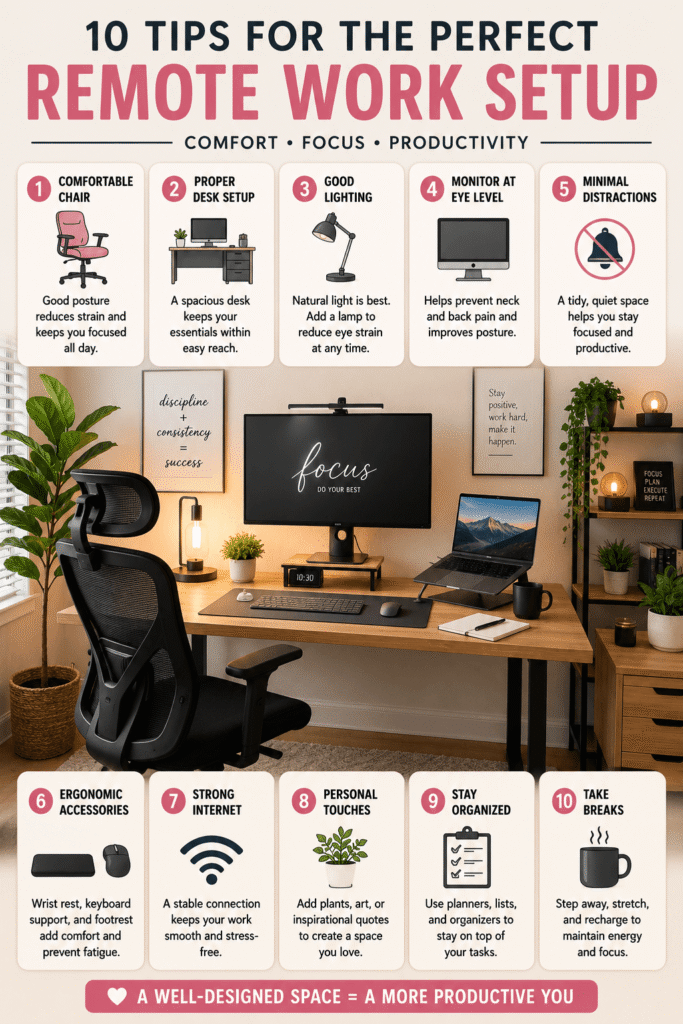
A good remote work setup can completely change the way your workday feels. When your desk is organized, your chair is comfortable, your lighting is pleasant, and your tools are easy to reach, it becomes much easier to focus and stay productive at home.
The best remote work setup does not have to be expensive or complicated. You do not need a huge office, custom furniture, or a picture-perfect room to create a workspace that supports your day. Even a small desk, quiet corner, or shared room can become a functional home office with the right layout and a few thoughtful upgrades.
This guide covers practical remote work setup ideas for comfort, focus, video calls, organization, and style. Whether you work from home full time, have a hybrid schedule, run a small business, freelance, study online, or need a cozy productivity corner, these ideas will help you create a workspace that feels both useful and inspiring.
Why Your Remote Work Setup Matters
Working from home gives you flexibility, but it can also blur the line between work time and personal time. A dedicated setup helps your brain recognize when it is time to focus. Even if your workspace is small, having a clear work zone can make your day feel more structured.
Your setup also affects your body. A laptop on a couch may feel comfortable for a few minutes, but it can quickly lead to neck strain, back discomfort, and tired eyes. A better desk arrangement can make long work sessions feel more manageable.
Finally, your home office affects motivation. A clean, calm, and attractive workspace can make remote work feel more intentional. When you enjoy sitting down at your desk, it is easier to begin tasks, stay organized, and end the day without feeling overwhelmed by clutter.
1. Choose an Ergonomic Chair
An ergonomic chair is one of the most important parts of a remote work setup. Since you may spend hours sitting each day, your chair should support your back, help you sit upright, and feel comfortable through long work blocks.
Look for a chair with adjustable height, supportive cushioning, and good lower-back support. If a new chair is not in your budget, you can improve a regular chair with a lumbar pillow, seat cushion, or folded blanket behind your lower back.
The goal is to sit with your feet flat on the floor, shoulders relaxed, and elbows close to your body. Small adjustments can make a big difference in how your body feels at the end of the day.
2. Set Up a Standing Desk Option
A standing desk can add movement to your day and help you avoid sitting in one position for too long. You do not need a full electric desk to get the benefit. A laptop stand, desk converter, or sturdy riser can create a simple standing option.
Try switching between sitting and standing during different tasks. You might sit for focused writing or detailed work, then stand during calls, planning, or email check-ins. The key is variety, not standing all day.
If you use a standing setup, keep your screen near eye level and your keyboard at a comfortable height. Your wrists should feel neutral, not bent upward or downward.
3. Use a Monitor Riser or Laptop Stand
A monitor riser or laptop stand can make your remote work setup feel instantly more professional. Raising your screen helps reduce neck strain because you are not constantly looking down at your laptop.
You can use a dedicated laptop stand, a monitor shelf, or even a sturdy stack of books. Pair it with an external keyboard and mouse so your hands stay comfortable while your screen stays higher.
This simple upgrade also creates extra space under your monitor for notebooks, sticky notes, a keyboard, or small desk accessories. It helps your desk look cleaner while improving your posture.
4. Add Cable Management
Cable clutter can make even a beautiful desk feel messy. Chargers, cords, headphones, lamps, and monitor cables can quickly tangle behind your workspace. A little cable management makes your setup look calmer and easier to clean.
Use cable clips, cord sleeves, Velcro ties, adhesive hooks, or a cable tray under the desk. Labeling cords can also help if you unplug devices often. Keep the cords you use daily easy to reach and tuck the rest out of sight.
A neat cable setup is especially helpful for small spaces. When cords are controlled, the entire desk feels more intentional and less chaotic.
5. Improve Your Desk Lighting
Good lighting is essential for remote work. Natural light can boost the mood of your workspace, but it is not always enough. A desk lamp helps you work comfortably during early mornings, cloudy days, and evening hours.
Place your desk near a window if possible, but avoid harsh glare directly on your screen. A soft desk lamp, floor lamp, or ring light can create a more balanced glow. Warm lighting feels cozy, while brighter neutral lighting can help with focus.
Lighting is also important for video calls. A light source in front of you usually looks better than one behind you. This helps your face appear clearer and avoids dark shadows during meetings.
6. Add Plants or Natural Decor
Plants can make a remote work setup feel fresh, calm, and less sterile. Even one small plant can soften the look of a desk and add life to the space. Try a pothos, snake plant, succulent, peace lily, or small herb pot.
If you do not have much natural light, choose low-maintenance plants or use realistic faux greenery. You can also bring in natural textures with wood trays, woven baskets, linen pinboards, ceramic mugs, or stone coasters.
Natural decor helps your workspace feel less like a temporary desk and more like a place you actually enjoy spending time.
7. Use Noise-Canceling Headphones
Noise-canceling headphones can be a game changer if you work in a busy home, shared apartment, or noisy neighborhood. They help block distractions and make calls sound clearer.
If full noise-canceling headphones are not needed, simple earbuds or a comfortable headset can still improve focus. Keep them on a hook, stand, or small tray so they are easy to grab before meetings.
You can also use background sounds to support concentration. Soft instrumental music, white noise, rain sounds, or coffee shop ambience can help create a work-friendly mood.
8. Create a Video Call Setup
A reliable video call setup helps you feel more prepared and professional. Start with your camera angle. Your webcam should be close to eye level so you are not looking too far down or up during calls.
Check the background behind you. A simple wall, bookshelf, plant, framed print, or tidy shelf works well. Avoid piles of laundry, messy counters, or cluttered rooms in view if possible.
Good lighting and clear audio matter more than a fancy background. A small ring light, desk lamp, or window-facing setup can make video calls look much better with very little effort.
9. Design a Cozy Work Corner
Not everyone has a separate home office, and that is okay. A cozy work corner can be just as effective when it is thoughtfully arranged. Use a small desk, narrow table, wall shelf, or compact writing station in a quiet area of your home.
Define the space with a rug, lamp, plant, wall art, or pinboard. These small visual cues help the area feel like a dedicated workspace, even if it is part of a bedroom, living room, dining room, or hallway.
Keep only work essentials nearby so the area does not become a clutter zone. A cozy corner should feel inviting, not crowded.
10. Add Smart Desk Storage
Desk storage is what keeps your remote work setup functioning day after day. Without storage, papers, pens, sticky notes, chargers, and notebooks can pile up quickly. The right organizers make cleanup easier.
Use drawer dividers, desktop trays, pen cups, file folders, baskets, shelves, or a rolling cart. Keep frequently used items within reach and store less-used supplies away from the main work surface.
A clear desk makes it easier to start the day with focus. It also helps you mentally close your workday when you tidy up at the end of your last task.
Small Remote Work Setup Ideas
If you live in a small home or apartment, focus on flexibility. A compact desk, folding table, wall-mounted shelf, or corner desk can give you a dedicated work area without taking over the room.
Vertical storage is especially helpful in small spaces. Add wall shelves, pegboards, hooks, or stacked organizers to keep the desktop clear. Choose furniture with hidden storage whenever possible.
- Use a narrow desk in an unused corner
- Add shelves above the desk for vertical storage
- Choose a chair that tucks fully under the desk
- Use a rolling cart for supplies you can move away later
- Keep the color palette simple so the space feels calm
Budget-Friendly Remote Work Setup Tips
You do not need to buy everything at once. Start with the upgrades that solve your biggest problem. If your neck hurts, raise your screen. If your desk feels messy, add storage. If calls look dark, improve your lighting.
Many remote work setup upgrades can be done with items you already own. A stack of books can raise a laptop, a basket can hide cords, a mug can hold pens, and a small lamp can brighten your desk.
Thrift stores, discount shops, and online marketplaces can also be great places to find desks, chairs, shelves, lamps, and organizers at lower prices. Focus on function first, then style.
How to Make Your Remote Work Setup Look Better
A good-looking desk is usually about balance, not perfection. Choose a simple color palette, keep surfaces clear, and repeat a few textures or colors. For example, black tech accessories, wood accents, white storage, and green plants can create a clean modern look.
Use one or two decorative items that make you happy, such as a framed quote, candle, small plant, photo, or ceramic dish. Too many decorations can become distracting, but a few personal touches make the space feel warm.
Remote Work Setup Checklist
Before you call your setup finished, check the basics. Your workspace should support your body, your focus, your tools, and your daily routine. A beautiful desk is helpful, but a comfortable and functional desk matters most.
- Comfortable chair with back support
- Screen at a comfortable height
- Keyboard and mouse positioned well
- Good lighting for work and video calls
- Organized cords and chargers
- Storage for papers and supplies
- Clear background for meetings
- A few personal touches for motivation
Final Thoughts on Creating a Remote Work Setup
Your remote work setup should help you feel comfortable, focused, and ready for the day. It does not need to look like a showroom or cost a lot of money. The best setup is the one that fits your space, your schedule, and the way you actually work.
Start with the basics: a supportive chair, raised screen, good lighting, organized cords, and simple storage. Then add details that make the space feel like yours, such as plants, art, cozy textures, or a calming color palette.
With a few thoughtful changes, your home workspace can become more than a place to open your laptop. It can become a productive, comfortable, and inspiring corner that supports your workday from start to finish.
Pinterest Titles
- 10 Remote Work Setup Ideas for a Better Home Office
- Remote Work Setup Tips to Make Your Desk Feel Productive
- Easy Home Office Ideas for the Perfect Remote Work Setup
Pinterest Description
Create a comfortable and productive remote work setup with these home office ideas, including ergonomic chairs, standing desks, monitor risers, cable management, better lighting, desk plants, noise-canceling headphones, video call setups, cozy work corners, and smart storage. These remote work setup tips are perfect for small spaces, hybrid workers, freelancers, and anyone who wants a more organized work-from-home desk. #RemoteWorkSetup #HomeOfficeIdeas #WorkFromHome #DeskSetup #HomeOfficeDecor #ProductivityTips #SmallHomeOffice #OfficeOrganization #WFHSetup #WorkspaceIdeas